
Answers at the Speed of the Conversation
Every Solutions Engineer knows the moment. You’re twenty minutes into a discovery call, the conversation is finally going somewhere, and the customer leans in: “Do you support SCIM provisioning with Azure AD, and what’s your API rate limit per tenant?”
You have two options. Guess, and risk being wrong on the record. Or say “let me get back to you,” and lose the momentum you just built.
While you should always take the time to research the correct answer (vs being wrong), it’s still a time consuming task. Enter (local) RAG. This is a perfect use case for AI when it comes to building a knowledge library where you can rapidly search for information mid-sentence.
Real-World Note: There are several approaches to building a local knowledgebase using AI. For this article I chose the RAG approach for both testing and the ability to fine tune the setup (since it is local).
Getting Field Ready
One of the greatest friction points in hiring a new SE, or really any seller, is getting them onboarded and up to speed quickly. For deeply technical solutions this can sometimes take 3 - 4 months for an SE to be fully ramped. While AI is not a replacement for onboarrding, it can greatly compress the timeline required for an SE to start making an impact. The faster a new SE gets to that point, the sooner they’re carrying calls on their own.
The (onboarding) problem is volume. A typical SE inherits hundreds of documents: architecture guides, security whitepapers, API references, pricing sheets, competitive battlecards, release notes, and a long tail of answered RFPs. Nobody memorises all of it. Field-ready doesn’t mean knowing everything. It means being able to retrieve the right thing in seconds.
That breaks down into two kinds of moments.
Live: discovery calls and demos. The customer asks, and you have a few seconds before the silence gets awkward. What you need:
- Precision on exact terms. Live questions are often about specifics: a protocol, a certification, a version, a limit. “Do you support SCIM?” needs the line that says SCIM, not a paragraph that’s vaguely about identity.
- Speed. An answer that takes ten seconds is an answer you don’t use.
- Something you can glance at. A short, highlighted snippet and its source, readable while you’re still talking.
Async: follow-ups, RFPs and security questionnaires. After the call come the emails, the “can you send over details on…” requests, and the 200-row spreadsheet from procurement. Here what matters is completeness and accuracy:
- Answers grounded in your own docs, with citations you can check before anything goes to a customer.
- An honest “I don’t know” when the docs don’t cover it, rather than a confident guess.
Introducing GTM Telescope
GTM Telescope is a field-readiness tool for SEs: point it at your docs, then ask it anything, mid-call or after. It has two commands, one for each kind of moment.
lens focusfor the live call. Type the question and get the most relevant snippets back in a single fast pass, each with its file and line number. Glance, answer, and keep the conversation moving.lens renderfor the follow-up. It takes those same results and drafts a response from them, using only what your documents actually say, and tells you plainly when they don’t cover the question.
Here’s how it works, and why it’s compact enough to run on your laptop.
Two Searches, One Answer
Telescope is deliberately small: a Python CLI, an embedding model, ripgrep and a SQLite file for vector storage. The pipeline has three stages.
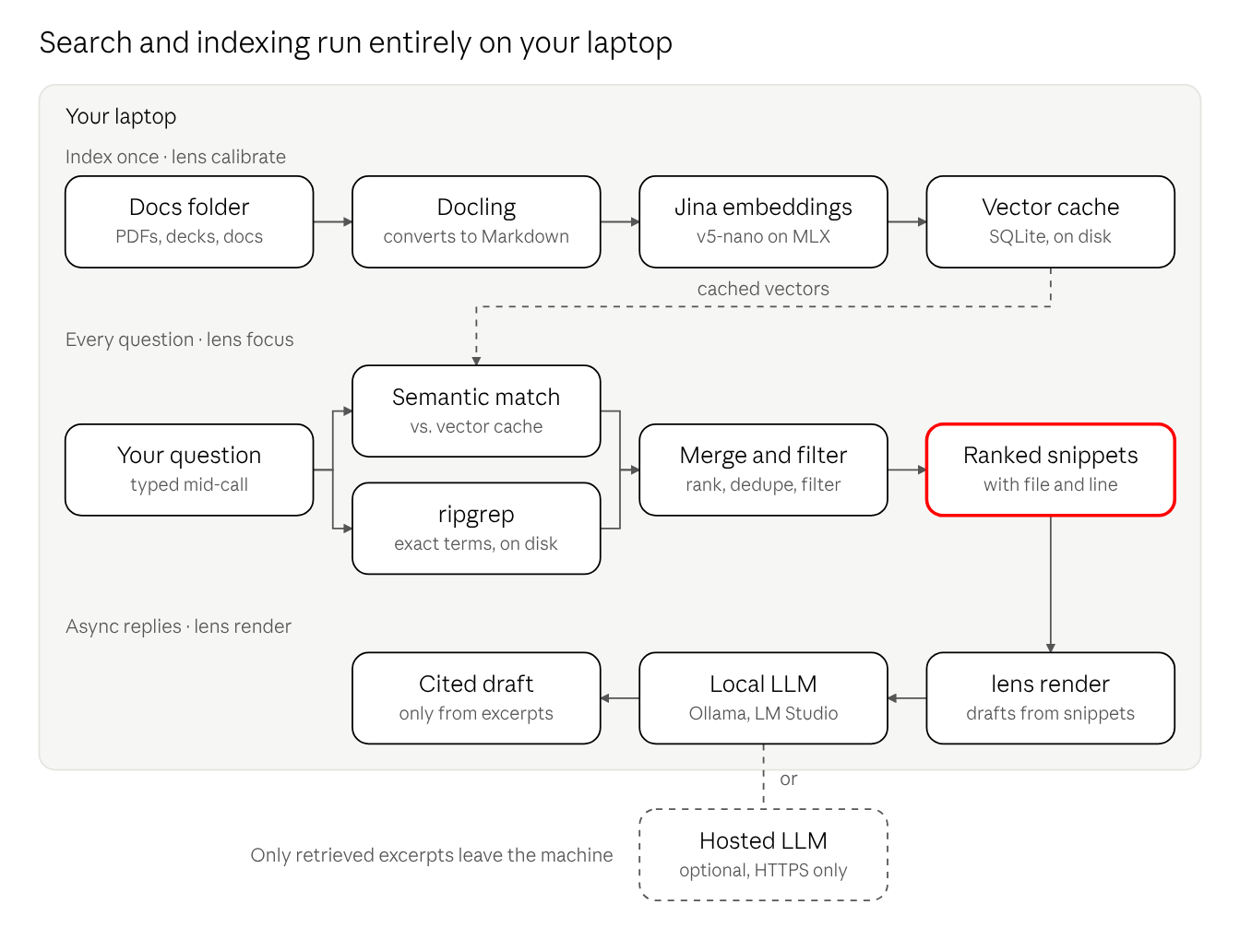
1. Index once with lens calibrate. Drop PDFs, Word docs, PowerPoint decks and spreadsheets into a folder. Docling converts them to Markdown, so a slide deck and a whitepaper become the same kind of searchable text. The text is split into chunks and embedded with Jina’s jina-embeddings-v5-nano, running locally on Apple Silicon through MLX. Vectors go into a SQLite cache on disk. Re-indexing is incremental: only files whose contents changed are embedded again.
2. Search every question two ways with lens focus. Each query runs two searches in parallel, because SE questions come in two flavours:
- Lexical (ripgrep) catches the exact terms customers use:
SCIM,FedRAMP,TLS 1.3, a port number, an error code. Embeddings are good at meaning and surprisingly bad at precise tokens. ripgrep is the opposite. - Semantic (Jina embeddings) catches intent. “How do you handle a database outage at peak load?” finds the failover runbook even if it never uses the word “outage.”
The two result sets are merged, deduplicated and filtered. A boilerplate filter strips out repeat text like copyright footers or schedule a demo links since they are immaterial to the answer we are searching for. What comes back is a short ranked list of snippets, each with its file and line number.
3. Draft async answers with lens render. For follow-ups and questionnaires, render sends the question and the retrieved snippets to a language model, with instructions to answer only from those excerpts and to say plainly when they aren’t enough.
Privacy by Design
Everything lens focus touches lives on your laptop. That one decision delivers the two things an SE needs most on a live call.
Speed. A search is a ripgrep scan of local files plus one embedding call to a model running on the same machine, followed by a single matrix multiply against vectors already in SQLite. There’s no network hop, no cold start on someone else’s server, and no rate limit. On Apple Silicon the embedding model runs natively through MLX, so the query is embedded in the time it takes to finish typing it.
Privacy. Discovery calls are full of things that shouldn’t leave the room: customer names, their architecture, their pain points, the deal context in your notes. With Telescope, the query and the corpus never leave the machine. The embedding server is pinned to localhost by default, and pointing it anywhere else requires an explicit opt-in.
Resilience. It works on a customer site with locked-down Wi-Fi, on a plane, or on a hotel connection that drops every ten minutes. Your knowledge base is as available as your laptop.
Generation is your choice. lens render talks to any OpenAI-compatible endpoint. Point it at a hosted model for the strongest drafts, or at a local model through Ollama or LM Studio and the whole pipeline runs offline. Either way, only the handful of retrieved excerpts are sent, never the full corpus, and remote endpoints must use HTTPS.
Real-world AI for the SE
Most AI tools pitched at SEs are chat windows: ask a question, get a fluent paragraph, hope it’s right. That’s a poor fit for someone whose credibility depends on being exactly right in front of a customer. Telescope takes a different approach, built around how SEs actually work.
- AI as grounded retrieval. The core job is finding the right line in your documents. The model’s role is to understand what you meant; the answer always comes from a source you can see.
- Provenance on every answer. Every result carries a file and line number. You can say “per our security whitepaper” and know it’s true, and you learn where knowledge lives as you go.
- Grounded drafting with a refusal built in.
renderis told to answer only from the retrieved excerpts and to say so when they fall short. For an SE, “not covered in the docs” is a useful answer. A plausible invention is a liability. - Ramp time measured in days, not quarters. A new SE doesn’t need to read everything before taking calls. They need the corpus indexed and a fast way to query it. Each answer also teaches them a little more of the product.
- Your data stays yours. Nothing about your customers, your deals or your internal docs needs to leave your laptop to get value from AI.
The result is AI that shows up where the SE’s job actually happens: in the middle of a conversation, under time pressure, with a customer listening. Drop your docs in a folder, run lens calibrate, and the next time someone asks about SCIM and rate limits, you’ll have the answer before the silence gets awkward.
Want to try this out yourself? Grab GTM Telescope here.