
An Early Warning System for GTM Ramp Time
Most GTM onboarding runs on post-mortems. A new Account Executive joins, works through the curriculum and starts building pipeline. An SE gets saddled with days of product knowledge videos. Nobody knows whether it’s working until Month 6, when the first quota milestone arrives and the number comes up short. By then the company has paid half a year of salary, a territory has gone under-worked, and qualified pipeline has gone cold.
The signals were there much earlier. An AE or SE who spent weeks searching for the same security answers. The discovery meetings that never turned into qualified opportunities. Nobody was reading these signals together.
In this final stage of GTM Telescope, we turn those very signals into an early warning system.
Missed the first two stages? You can read Stage 1 and Stage 2 to get caught up.
Every week, Stage 3 forecasts each new rep’s ramp, whether they’re an AE or an SE, and compares it with how tenured person ramped. When a forecast drifts off course, Telescope acts: a written diagnosis for the manager and targeted content for the rep. The goal is to move the moment of discovery from Month 6 to Week 6.
| Traditional Enablement | Predictive Enablement | |
|---|---|---|
| When problems surface | Month 6, at the first missed milestone | Weeks 4 to 6, from leading signals |
| What happens next | A post-mortem | A diagnosis and targeted coaching |
| Outcome | Lost months and lost pipeline | Ramp corrected while there’s still time |
Two Signals Are Better Than One
Stage 2 already captures the first signal. Every question asked through Slack, the web, or the live-call assistant is logged, along with what was retrieved and how the SE reacted. Stage 3 pairs that with the second signal: the CRM.
Cognitive telemetry: what the SE is learning. This comes from search logs and is a leading indicator of knowledge mastery.
- Volume and Velocity: a rolling 7-day count of questions, and how quickly that count is changing.
- Topic Mix: the share of questions about basic product specs, competitor displacement or pricing exceptions. An SE still spending 70% of their Week 6 questions on basic architecture is behind on the foundations.
- Friction: thumbs-down reactions, results never opened, and three or more follow-ups on the same document.
Behavioral telemetry: what the SE is doing. This comes from the CRM and is a leading indicator of execution.
- Outbound activity and accounts touched.
- Discovery meetings held and Stage 1 opportunities created.
- Pipeline created and how long deals sit in each stage.
Neither signal is enough alone. Plenty of activity combined with heavy confusion predicts stalled deals. Deep product knowledge with little activity predicts an empty pipeline. However, taken together, they describe both what someone knows and what they’re doing with it.
The Architecture: Telemetry, Forecast, Intervention
At the center of Stage 3 is Timestral, the family of time-series foundation models from Mistral. It produces probabilistic forecasts as 21 quantiles, accepts both past-only and known-future covariates, and works zero-shot on data it has never seen.
Stage 3 adds four layers on top of the architecture from the prior stage:
- Telemetry. CRM change events and Stage 2 search logs are rolled up into a weekly series for each SE.
- Forecasting. Timestral projects each SE’s deal trajectory 8 to 12 weeks ahead, as a band of outcomes rather than a single number.
- Decision. A trajectory check compares the forecast with the ramp benchmark of tenured SEs.
- Intervention. When an SE drifts off track, a small model writes a diagnosis, and Telescope pushes targeted content to the SE and a briefing to their manager.
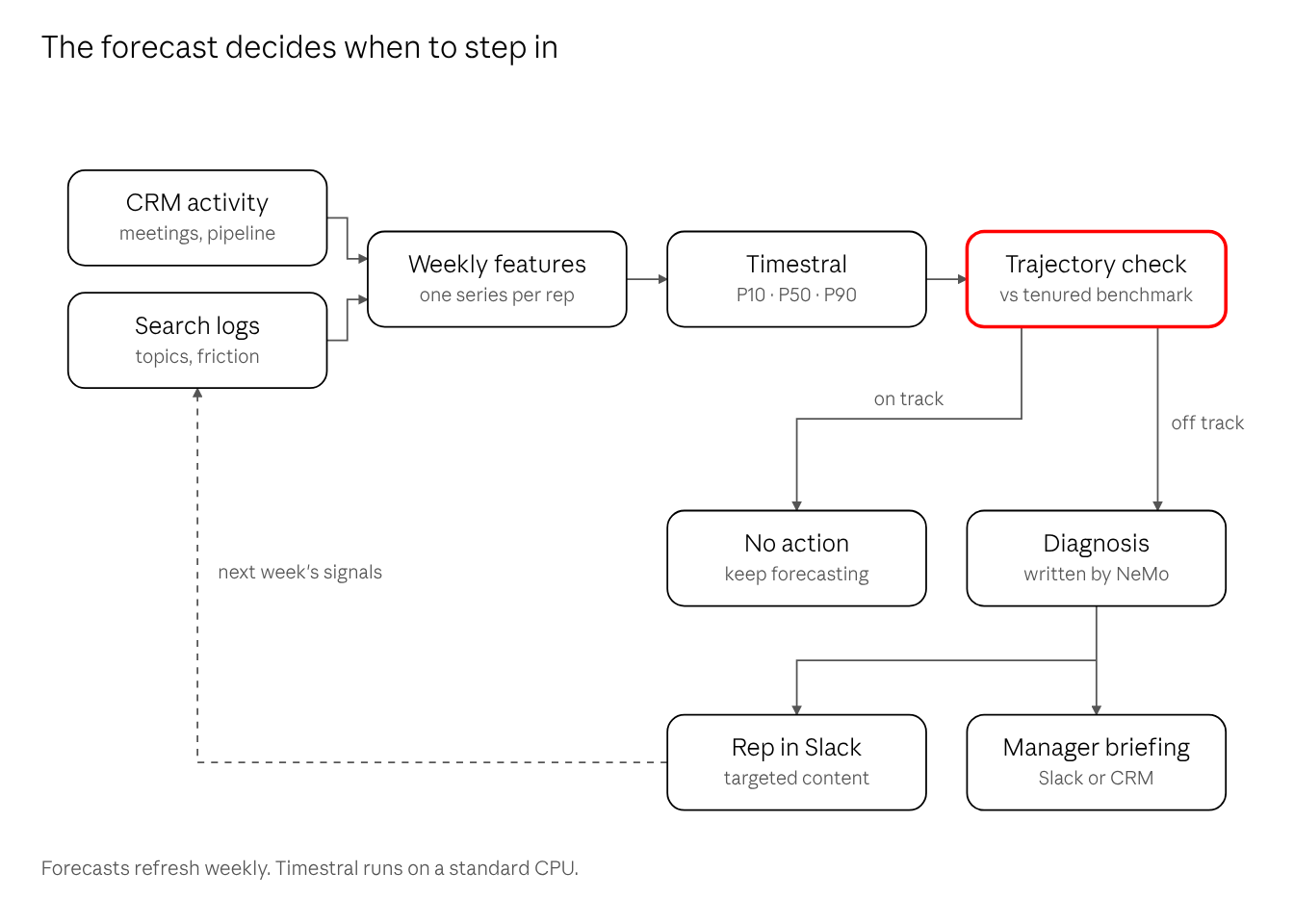
When an SE stays on track, nothing happens. When they drift, the SE and the manager both hear about it, and the next week’s signals show whether the help worked. Let’s look at the four layers a little deeper.
Layer 1: Telemetry
Signals are aggregated into weekly epochs. Daily GTM activity is too noisy, while deal movement and knowledge mastery show clean trends over 7- and 14-day windows. Each week becomes one row in a multivariate time series, and Timestral receives four kinds of input:
| Input | What goes in |
|---|---|
| Target series | Net-new pipeline created per week ($), and weighted stage transitions (deals moving past Discovery) |
| Past-only covariates | Query volume, topic mix, friction index, outbound activity, discovery meetings, Stage 1 opportunities |
| Known-future covariates | Scheduled certification check-offs, quarter-end and kickoff weeks, quota step-ups (for example 25% in Month 2, 50% in Month 3, 100% in Month 6) |
| Categorical context | Segment, prior experience, territory tier |
Timestral takes categorical covariates directly, so fixed attributes such as customer segment are passed as categories that stay constant from week to week. They matter because an SMB seller and an Enterprise seller don’t ramp at the same pace.
The target is pipeline movement, not closed revenue, on purpose. Closed-won takes 90 to 180 days to show up (or longer), which is far too late for an early warning. Pipeline created and deals advancing past Discovery are the leading proxies.
Layer 2: Forecasting with Timestral
- Zero-shot first. GTM teams hire in small cohorts, often 10 to 50 people a year. Training a forecasting model from scratch on that little data overfits badly. A pre-trained foundation model can produce a usable forecast from day one.
- The short-history problem. At Week 4, a new hire has four data points, which is thin for any model. Two things carry the weight: the known-future covariates tell the model what the calendar and the expected ramp look like ahead of time, and past cohorts provide the shape of a typical ramp.
- Fine-tuning when the history exists. With two to three years of CRM and activity history, Timestral can be fine-tuned through Mistral Forge on past activities and trajectories. That teaches it the company’s real sales cycle, a 120-day enterprise cycle versus a 30-day transactional one.
- Cheap to run. Even the largest Timestral model forecasts in a fraction of a second on a standard CPU. Refreshing a forecast for every person in the org each week costs almost nothing.
Layer 3: Decisions
Timestral returns 21 quantiles, from the 1st to the 99th percentile. Three of them do most of the work:
- P50, the median path: the most likely trajectory.
- P10, the conservative floor: if even the pessimistic path clears the ramp threshold, the person is very likely on track and needs no intervention.
- P90 minus P10, the spread: a measure of risk. A wide band can signal over-reliance on one outsized deal rather than a more even spread.
The trajectory check turns those bands into rules. For example: flag someone whose P50 is below 70% of the expected pipeline for Week 6, whose P50 projects below 80% of the ramp benchmark at Week 10, or whose spread keeps widening week over week. The thresholds are starting points, tuned against each team’s own history.
Before going live, backtest the check on past cohorts. Would it have flagged, by Week 6, the AE or SE who went on to miss their Month 6 milestone? And how many who ramped fine would it have flagged by mistake? Those two numbers decide whether managers trust the alerts.
Layer 4: Interventions
A forecast nobody acts on is just another dashboard. When the trajectory check flags an issue, three things happen automatically.
1. A written diagnosis. The forecast, recent search telemetry and CRM status go to a small model, which writes a short root-cause summary. We don’t want leaders reading time-series charts. They read sentences, and a clear sentence drives a coaching conversation.
Here is an illustrative example.
Kristen is an Enterprise AE in Week 5 of her ramp period. Her current forecast is $80k against a $250k benchmark by Week 10 due to stalled deals. In the last 14 days, she has searched Telescope with 42 questions, 68% of them about SOC 2 Type II, vendor risk assessments, and self-hosted deployment. The CRM contains four opportunities stalled in Technical Review.
The Diagnosis: “Kristen’s ramp is stalling at technical evaluation. Her searches show heavy friction with enterprise InfoSec objections. Her discovery pipeline is healthy, but deals are bottlenecked at security review. Recommend pairing her with a Solutions Engineer for deal reviews on her two largest stalled accounts.”
2. Proactive enablement. Instead of waiting for Kristen to search, GTM Telescope comes to her in Slack. It surfaces the verified InfoSec objection-handling battlecards from Stage 2 and drafts security talk tracks tailored to the prospects currently stuck in her pipeline.
3. A briefing for the manager. The diagnosis and the evidence behind it (topic mix and CRM status, never individual queries) land in Slack or the CRM, ready for the next one-to-one.
Then the loop closes. Next week’s search and CRM signals show whether the intervention worked, and the forecast updates accordingly.
Design Decisions
| Decision | Approach | Why |
|---|---|---|
| Forecasting engine | Timestral foundation model | Short per-resource histories and small cohorts are too little data to train a forecasting model from scratch. A pre-trained model works zero-shot. |
| Telemetry cadence | Weekly aggregation | Daily sales signals are noisy. Pipeline creation and knowledge mastery trend cleanly over 7 and 14 days. |
| Forecast target | Pipeline created and stage progression, as quantiles | Closed-won lags by 90 to 180 days. Pipeline and stage movement lead, and bands show uncertainty honestly. |
| Diagnostic output | Written summary from a small model | Managers act on a clear explanation, not on charts they have to interpret. |
Coaching, Not Surveillance
An early warning system built on what people search for can easily become something nobody wants to use. These rules keep it honest:
- Never penalize asking. Basic questions in Week 2 are healthy. The signal is still being stuck on them in Week 8. If someone believe their searches count against them, they stop searching, and Stages 1 and 2 stop working. The model reads trends in topic mix and friction, and managers never see raw query logs.
- Self-reflection first. The new hire gets their own trajectory and suggested content before, or alongside, their manager. Nobody should learn about a warning in a performance review.
- Support, not judgment. Alerts trigger help: content, deal reviews, peer pairing. They don’t feed ratings or termination decisions.
- Forecasts are probabilities, not verdicts. A P50 below the line is a prompt for a conversation, not a conclusion.
- Be transparent about the data. Tell new hires what is collected and why, keep retention short, and review the program with HR and legal before launch. In some regions, monitoring employee activity requires works council consultation or a data protection assessment.
Real-World Tip: Document internal wins. An AE or SE who was flagged early, got the right help and hit their ramp milestones is the most convincing case you can make to the rest of the GTM team.
From Proof of Concept to GTM Execution
What started as a simple proof of concept on one SE’s laptop has grown into a full production GTM workflow with early warning built right in. It can fundamentally change what onboarding and enablement look like for new hires across GTM.
Instead of “why is this rep struggling?” at Month 6, it becomes “what does this rep need?” at Week 6, while the answer can still change the outcome.
Search, telemetry, and coaching stop being three separate tools. They become one loop: every question someone asks makes the next forecast sharper, and every forecast makes the next answer more useful.